Group texts and a spreadsheet might work, until they don't.
The clarity your crew has been looking for.
Built for the field. Clear for the office.
Product UI ads — same Lakeside Custom job as the landing page. Story and feed frames use the iPad shell with sidebar; wide frames use the landscape layout. Post the live trial captions. The earlier bank stays in this kit for reference.
Not all project management apps are the same. Ours was built with the builder in mind.
Redeemer Ridge PM is field-first job management for builders that manage the work wherever the job takes them — not an enterprise suite, and not another spreadsheet. This table stays in the kit. It is not on the public site.
Serious PM. A published price.
Pro is $59/mo. Crew $99. Team $199. Company $269. Printed on the site — not a quote after a demo.
Designed for the driveway, not the desk.
Daily log with the camera. Ask BOB before you leave. Punch on the job. To Do for the whole company. The office sees the same job.
Owner gets a link. Not a login. Not your numbers.
Pictures and dates. Job cost stays with you. Stop screenshotting the schedule into the group text.
BOB never leaves the job.
Ask BOB on the daily log for a recap and flags. Check with BOB on the schedule before you commit dates. He reads what you logged. He does not invent work.
What matters
Redeemer Ridge PM
Residential all-in-one
Enterprise PM
Group texts + a spreadsheet
Built for
Residential builders who live on the phone — including the shop that already leads the market
Residential offices that want every module
Commercial jobs with dozens of stakeholders
Whoever happens to have the thread
Price
Published: Pro $59 · Crew $99 · Team $199 · Company $269 / mo
Quoted — often hundreds a month, plus setup
Sales call and a custom contract
$0 until a missed bill or a blown date
Field
Log, punch, photos, and To Do on the phone you already carry
Full office suite with a mobile app attached
Desk software first; field is a companion
Photos in camera roll. Dates in the group text.
Daily log & camera
Who was on site, what got done, weather — then Take photo. Pictures stay on the job, not in a camera roll.
A log module in the office suite
Field reports typed up later at the desk
Photos in someone’s camera roll. Notes in the group text.
BOB
Ask BOB on the daily log. Check with BOB before you commit dates. He recaps what you wrote and flags what looks off — he does not invent work.
A chatbot or a help center
Dashboards for the project office
Nobody reads the thread until something breaks
Building department
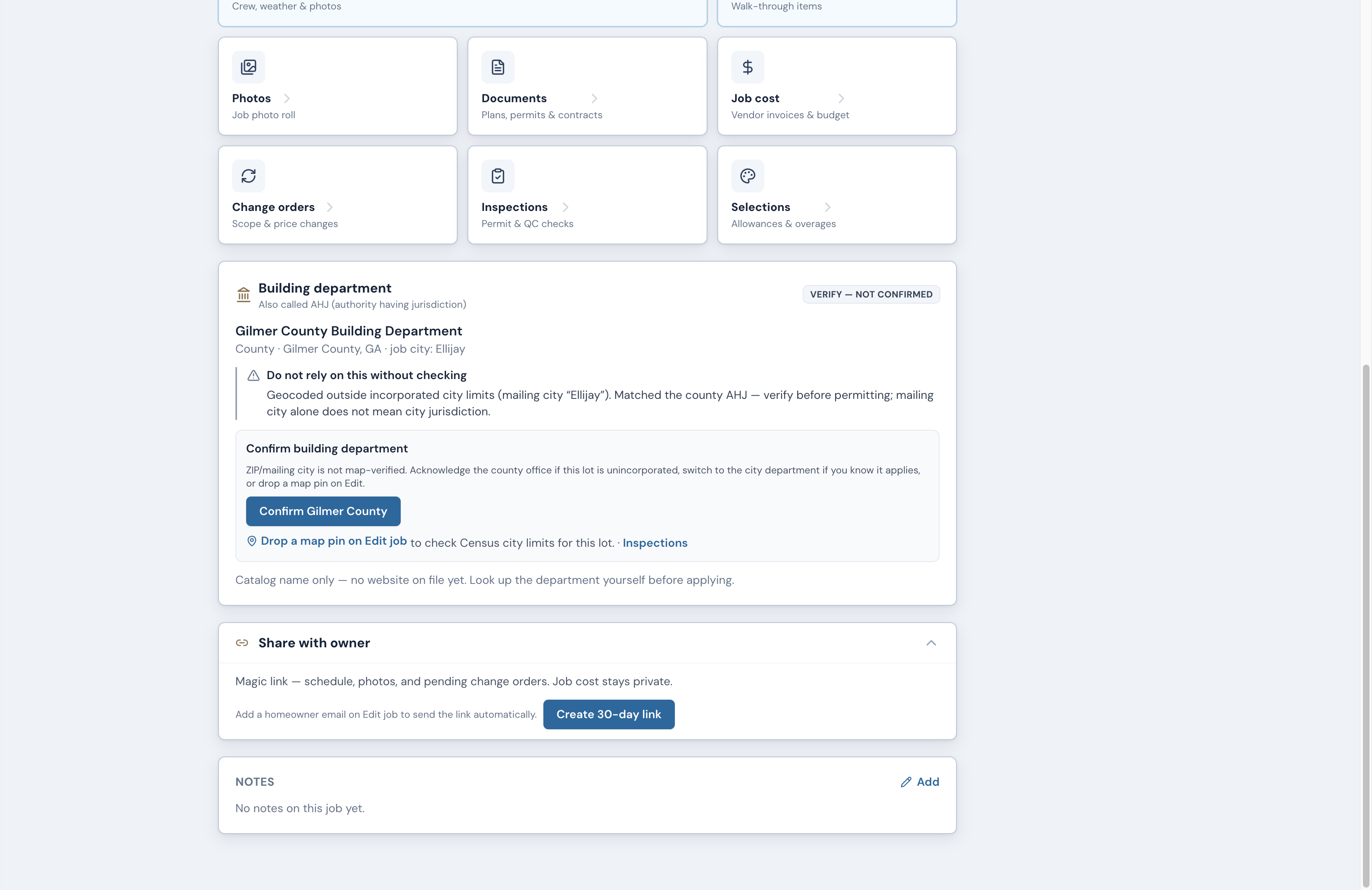
The permit office for that address — city or county — with their website and inspection portal on the job. Florida and Georgia today.
Permit tracking if you buy that module
Compliance tools for commercial jurisdictions
A folder of PDFs named Inspection
Owner
Magic link — pictures and dates. Not your costs. No owner login.
Homeowner login and a selections workflow
Owner as another seat on a commercial project
Screenshot the schedule into the thread
Job cost
Bills and POs hit the same job as the log — on the phone
Budgets plus accounting export
Deep commercial cost control
The sheet that is always a week behind
Setup
Try it free. No eight-week implementation.
Demo, onboarding, change-the-company process
Implementation team measured in months
Already in chaos
Your data
One private company workspace. Invite only. Owner, admin, and member roles you control.
Vendor network plus your jobs
Multi-company project with shared stakeholders
On every phone in the thread
Building department means the city or county office that issues permits and inspections for that lot — the office builders often call the AHJ. We look it up from the job address and put their website and inspection portal on the job. Florida and Georgia today.
What matters · Wide · 16:9 · 1920×1080Download this table
Not all project management apps are the same. Ours was built with the builder in mind.
Try it free · pm.redeemerridge.com
What matters
Redeemer Ridge PM
Residential all-in-one
Enterprise PM
Group texts + a spreadsheet
Built for
Residential builders who live on the phone — including the shop that already leads the market
Residential offices that want every module
Commercial jobs with dozens of stakeholders
Whoever happens to have the thread
Price
Published: Pro $59 · Crew $99 · Team $199 · Company $269 / mo
Quoted — often hundreds a month, plus setup
Sales call and a custom contract
$0 until a missed bill or a blown date
Field
Log, punch, photos, and To Do on the phone you already carry
Full office suite with a mobile app attached
Desk software first; field is a companion
Photos in camera roll. Dates in the group text.
Daily log & camera
Who was on site, what got done, weather — then Take photo. Pictures stay on the job, not in a camera roll.
A log module in the office suite
Field reports typed up later at the desk
Photos in someone’s camera roll. Notes in the group text.
BOB
Ask BOB on the daily log. Check with BOB before you commit dates. He recaps what you wrote and flags what looks off — he does not invent work.
A chatbot or a help center
Dashboards for the project office
Nobody reads the thread until something breaks
Building department
The permit office for that address — city or county — with their website and inspection portal on the job. Florida and Georgia today.
Permit tracking if you buy that module
Compliance tools for commercial jurisdictions
A folder of PDFs named Inspection
Owner
Magic link — pictures and dates. Not your costs. No owner login.
Homeowner login and a selections workflow
Owner as another seat on a commercial project
Screenshot the schedule into the thread
Job cost
Bills and POs hit the same job as the log — on the phone
Budgets plus accounting export
Deep commercial cost control
The sheet that is always a week behind
Setup
Try it free. No eight-week implementation.
Demo, onboarding, change-the-company process
Implementation team measured in months
Already in chaos
Your data
One private company workspace. Invite only. Owner, admin, and member roles you control.
Vendor network plus your jobs
Multi-company project with shared stakeholders
On every phone in the thread
Building department means the city or county office that issues permits and inspections for that lot — the office builders often call the AHJ. We look it up from the job address and put their website and inspection portal on the job. Florida and Georgia today.
Not all project management apps are the same. Ours was built with the builder in mind.
Try it free · pm.redeemerridge.com
What matters
Redeemer Ridge PM
Residential all-in-one
Enterprise PM
Group texts + a spreadsheet
Built for
Residential builders who live on the phone — including the shop that already leads the market
Residential offices that want every module
Commercial jobs with dozens of stakeholders
Whoever happens to have the thread
Price
Published: Pro $59 · Crew $99 · Team $199 · Company $269 / mo
Quoted — often hundreds a month, plus setup
Sales call and a custom contract
$0 until a missed bill or a blown date
Field
Log, punch, photos, and To Do on the phone you already carry
Full office suite with a mobile app attached
Desk software first; field is a companion
Photos in camera roll. Dates in the group text.
Daily log & camera
Who was on site, what got done, weather — then Take photo. Pictures stay on the job, not in a camera roll.
A log module in the office suite
Field reports typed up later at the desk
Photos in someone’s camera roll. Notes in the group text.
BOB
Ask BOB on the daily log. Check with BOB before you commit dates. He recaps what you wrote and flags what looks off — he does not invent work.
A chatbot or a help center
Dashboards for the project office
Nobody reads the thread until something breaks
Building department
The permit office for that address — city or county — with their website and inspection portal on the job. Florida and Georgia today.
Permit tracking if you buy that module
Compliance tools for commercial jurisdictions
A folder of PDFs named Inspection
Owner
Magic link — pictures and dates. Not your costs. No owner login.
Homeowner login and a selections workflow
Owner as another seat on a commercial project
Screenshot the schedule into the thread
Job cost
Bills and POs hit the same job as the log — on the phone
Budgets plus accounting export
Deep commercial cost control
The sheet that is always a week behind
Setup
Try it free. No eight-week implementation.
Demo, onboarding, change-the-company process
Implementation team measured in months
Already in chaos
Your data
One private company workspace. Invite only. Owner, admin, and member roles you control.
Vendor network plus your jobs
Multi-company project with shared stakeholders
On every phone in the thread
Building department means the city or county office that issues permits and inspections for that lot — the office builders often call the AHJ. We look it up from the job address and put their website and inspection portal on the job. Florida and Georgia today.
We do not chase national production homebuilders, and we do not pretend to be Procore for commercial RFI/submittal machines. We do not pretend to be a full selections + warranty office suite. If you need those, buy those. If you need the job, the log, the cost, and the owner on one phone — including a residential shop that is already big in its town — that is this product.
Live from Tue Aug 25 · 9:00 AM ET
After Tuesday
Posting order
Download the product UI PNG, paste the matching caption. Same sample job everywhere — Lakeside Custom. Dark ink variants use the on-dark lockup.
1. Launch day
Stop screenshotting the schedule into the group text.
Meta + X · 1:1 product UI
2. Day 2
Built for the field. Clear for the office.
Meta Feed · 1:1 product UI
3. Midweek
Document the job where the work happens.
Meta Story + Reel · 9:16 vertical
4. Week 2
Don't let the spreadsheet become the job.
Meta + LinkedIn + X · 1:1 and 16:9
Feed · 1:1
ScheduleFeed · 1:1 · 1080×1080
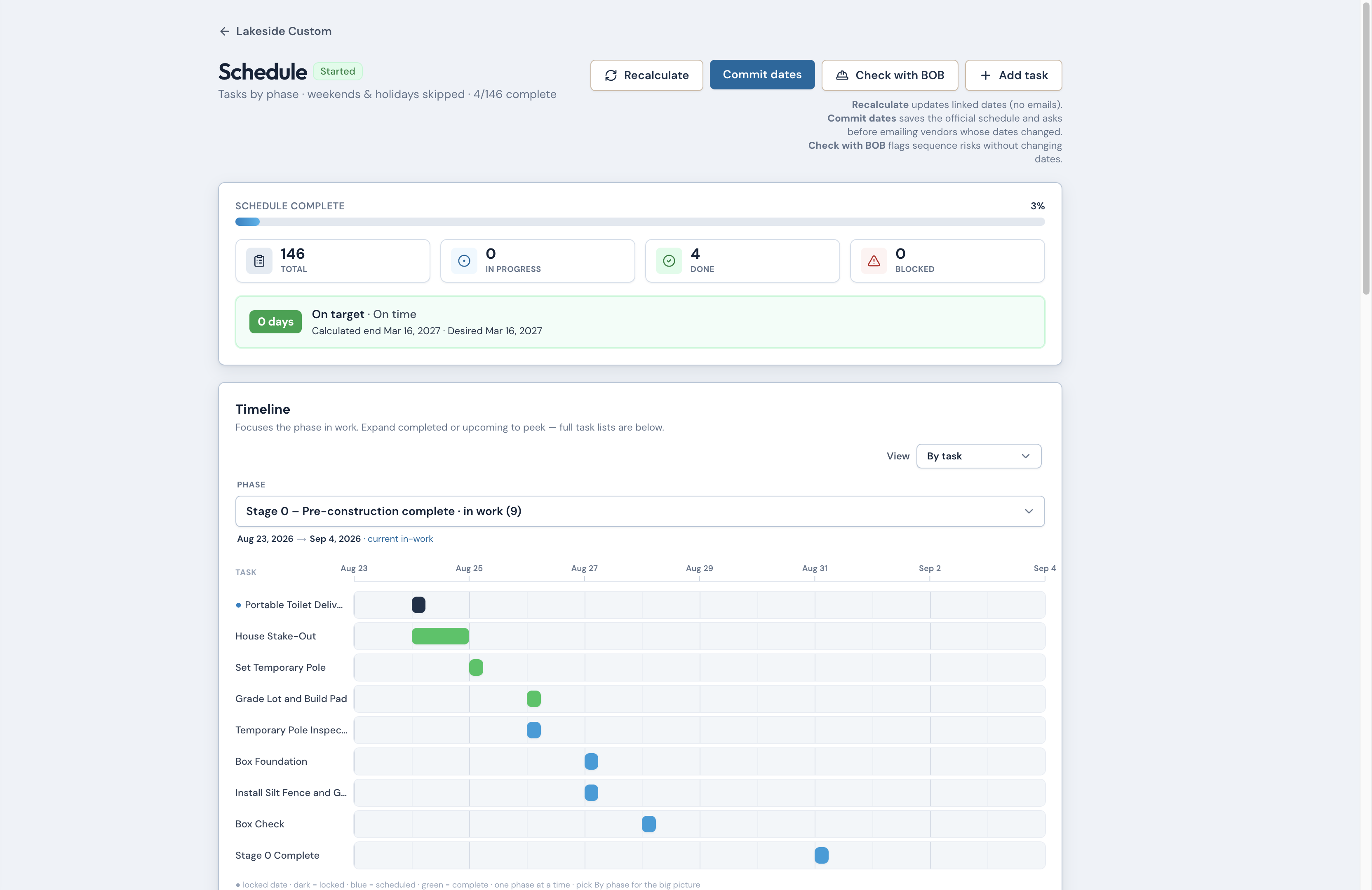
Dates that stay tied to the work.
9:41pm.redeemerridge.com80%
Try it free · pm.redeemerridge.com
Dates that stay tied to the work.
9:41pm.redeemerridge.com80%
Try it free · pm.redeemerridge.com
Job homeFeed · 1:1 · 1080×1080
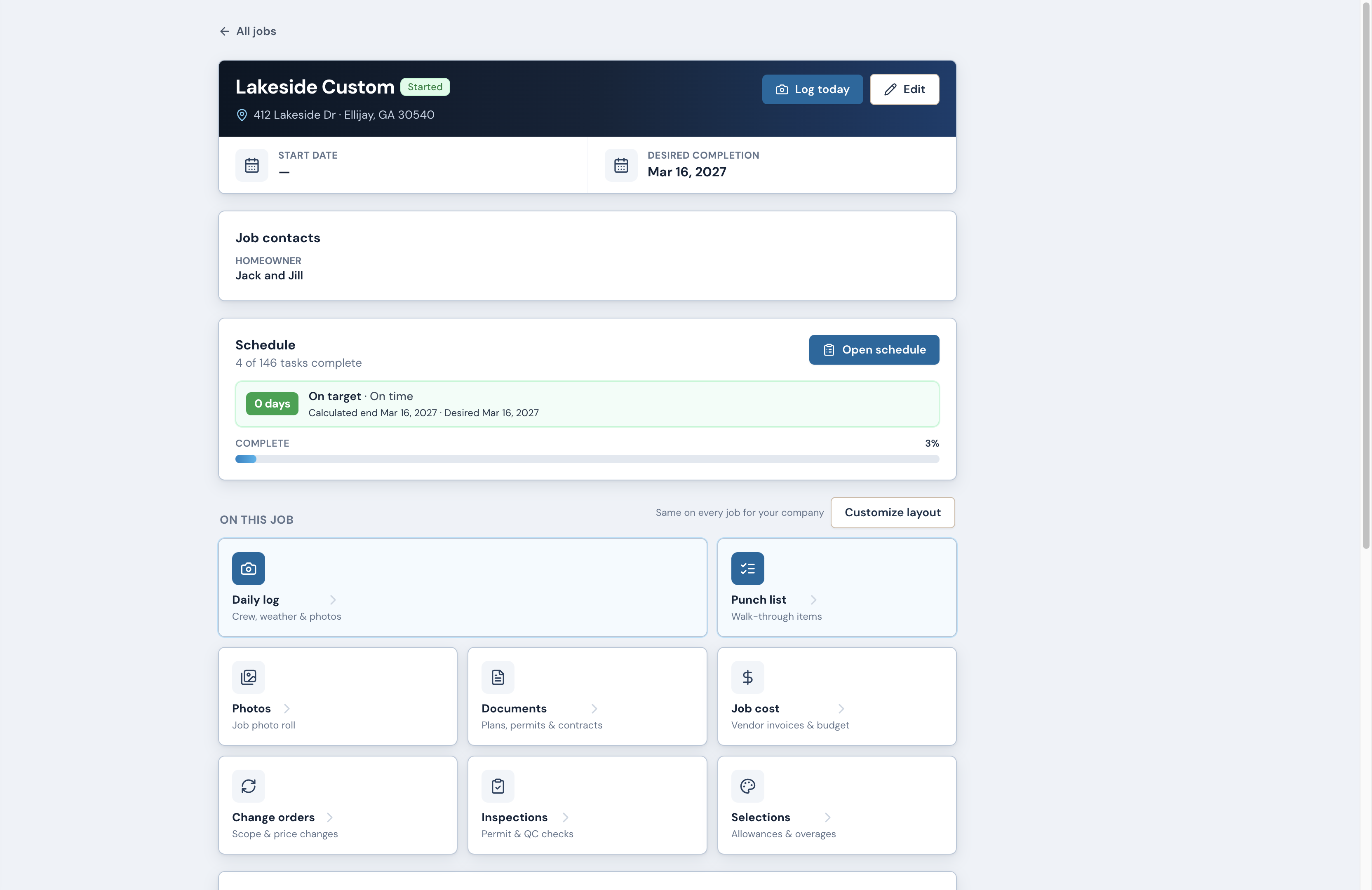
Built for the field. Clear for the office.
9:41pm.redeemerridge.com80%
Try it free · pm.redeemerridge.com
Built for the field. Clear for the office.
9:41pm.redeemerridge.com80%
Try it free · pm.redeemerridge.com
Daily logFeed · 1:1 · 1080×1080
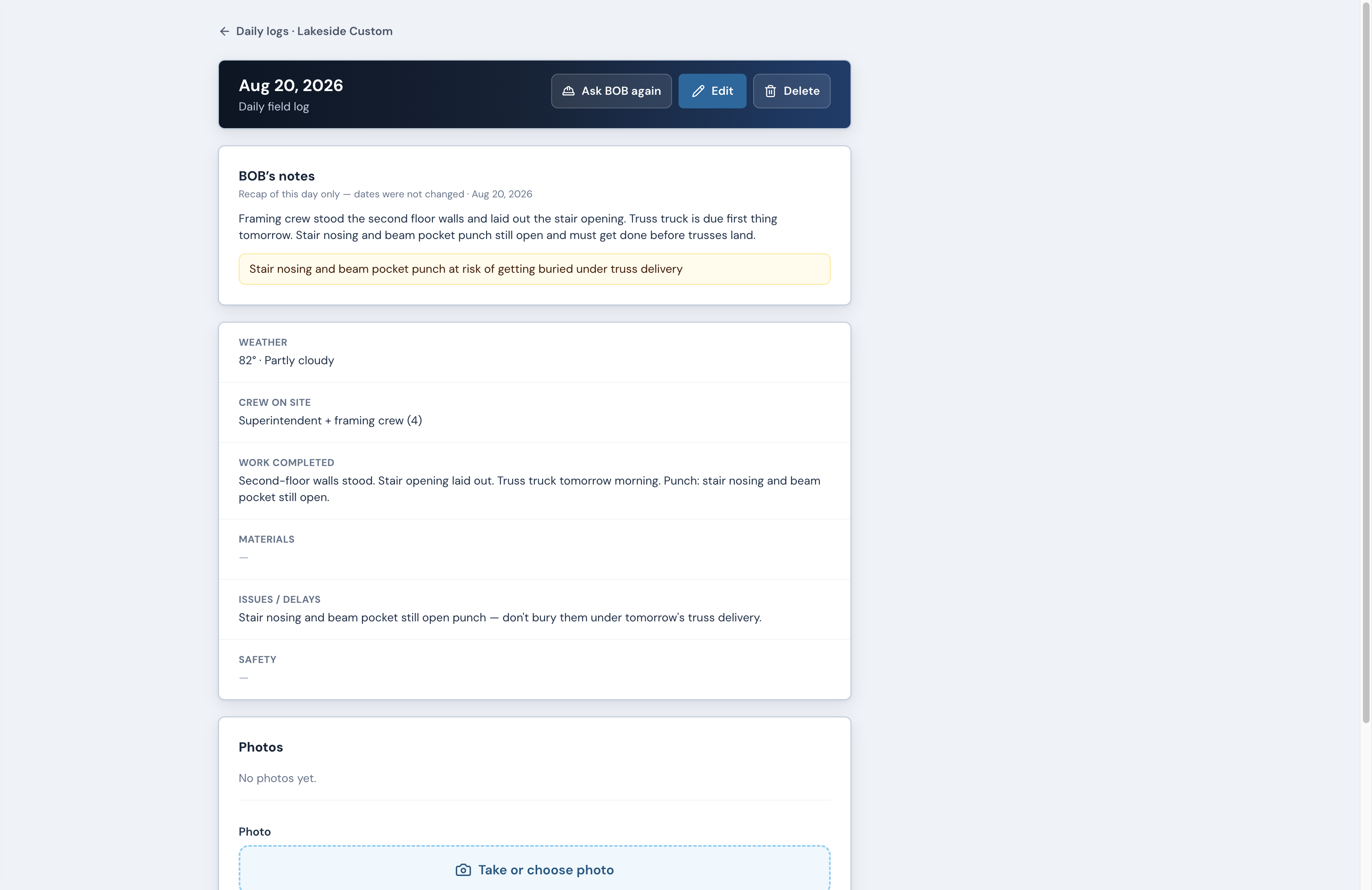
Document the job where the work happens.
9:41pm.redeemerridge.com80%
Try it free · pm.redeemerridge.com
Document the job where the work happens.
9:41pm.redeemerridge.com80%
Try it free · pm.redeemerridge.com
Job costFeed · 1:1 · 1080×1080
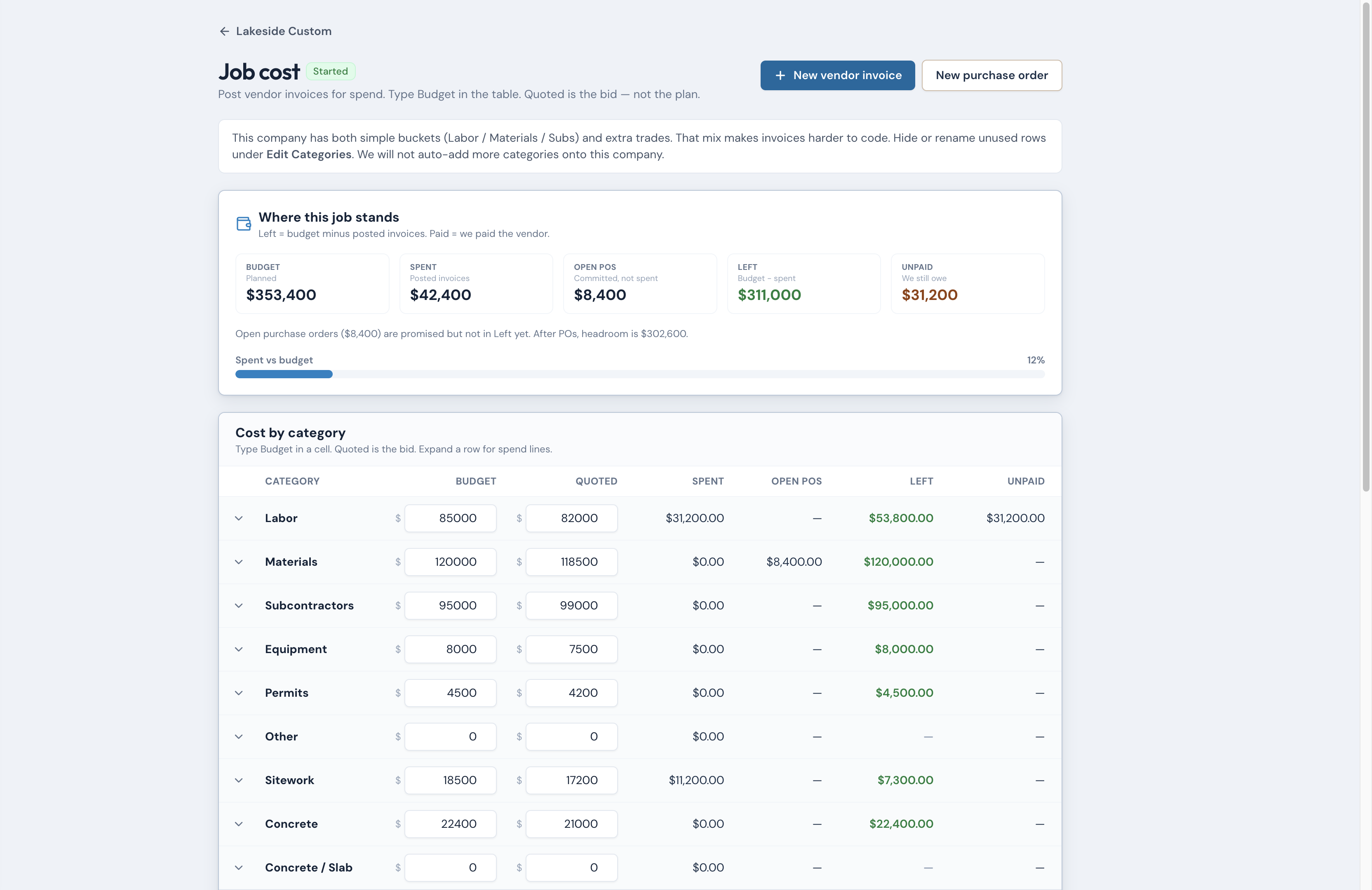
Don't let the spreadsheet become the job.
9:41pm.redeemerridge.com80%
Try it free · pm.redeemerridge.com
Don't let the spreadsheet become the job.
9:41pm.redeemerridge.com80%
Try it free · pm.redeemerridge.com
Share with ownerFeed · 1:1 · 1080×1080
Stop screenshotting the schedule into the group text.
9:41pm.redeemerridge.com80%
Try it free · pm.redeemerridge.com
Stop screenshotting the schedule into the group text.
9:41pm.redeemerridge.com80%
Try it free · pm.redeemerridge.com
Ink · 1:1 dark lockup
Job home · inkFeed · 1:1 · 1080×1080
Built for the field. Clear for the office.
9:41pm.redeemerridge.com80%
Try it free · pm.redeemerridge.com
Built for the field. Clear for the office.
9:41pm.redeemerridge.com80%
Try it free · pm.redeemerridge.com
Job cost · inkFeed · 1:1 · 1080×1080
Don't let the spreadsheet become the job.
9:41pm.redeemerridge.com80%
Try it free · pm.redeemerridge.com
Don't let the spreadsheet become the job.
9:41pm.redeemerridge.com80%
Try it free · pm.redeemerridge.com
Story · 9:16
Meta Stories / Reels and X vertical. Keep CTA above the bottom safe zone.
Job homeStory · 9:16 · 1080×1920
Built for the field. Clear for the office.
9:41pm.redeemerridge.com80%
Try it free · pm.redeemerridge.com
Built for the field. Clear for the office.
9:41pm.redeemerridge.com80%
Try it free · pm.redeemerridge.com
Daily logStory · 9:16 · 1080×1920
Document the job where the work happens.
9:41pm.redeemerridge.com80%
Try it free · pm.redeemerridge.com
Document the job where the work happens.
9:41pm.redeemerridge.com80%
Try it free · pm.redeemerridge.com
Share with ownerStory · 9:16 · 1080×1920
Stop screenshotting the schedule into the group text.
9:41pm.redeemerridge.com80%
Try it free · pm.redeemerridge.com
Stop screenshotting the schedule into the group text.
9:41pm.redeemerridge.com80%
Try it free · pm.redeemerridge.com
Wide · 16:9
ScheduleWide · 16:9 · 1920×1080
iPad · full screen
Dates that stay tied to the work.
Try it free · pm.redeemerridge.com
9:41pm.redeemerridge.com80%
iPad · full screen
Dates that stay tied to the work.
Try it free · pm.redeemerridge.com
9:41pm.redeemerridge.com80%
Job costWide · 16:9 · 1920×1080
iPad · full screen
Don't let the spreadsheet become the job.
Try it free · pm.redeemerridge.com
9:41pm.redeemerridge.com80%
iPad · full screen
Don't let the spreadsheet become the job.
Try it free · pm.redeemerridge.com
9:41pm.redeemerridge.com80%
Job homeWide · 16:9 · 1920×1080
iPad · full screen
Built for the field. Clear for the office.
Try it free · pm.redeemerridge.com
9:41pm.redeemerridge.com80%
iPad · full screen
Built for the field. Clear for the office.
Try it free · pm.redeemerridge.com
9:41pm.redeemerridge.com80%
Captions
Caption · schedule
Dates that stay tied to the work.
Working days, dependencies, and the next task — not a calendar nobody trusts.
Try it free · pm.redeemerridge.com
Caption · job
Built for the field. Clear for the office.
Open the job. Log the day. Punch what's left. Same phone your office already trusts.
Try it free · pm.redeemerridge.com
Caption · log
Document the job where the work happens.
Crew, weather, photos — before you leave the driveway. Not a folder you deal with Friday.
Try it free · pm.redeemerridge.com
Caption · cost
Don't let the spreadsheet become the job.
Bills hit the job. POs show what's already committed. The number is the job, not a spreadsheet.
Try it free · pm.redeemerridge.com
Caption · share
Stop screenshotting the schedule into the group text.
Send the owner a link. Pictures and dates. Not your costs.
Try it free · pm.redeemerridge.com
X (Twitter)
How to post on X
X is the short-post network, not a second set of ads. Download a PNG from the Feed / Story / Wide ads above, then paste one of the tweets below. Every post ends with Try it free · pm.redeemerridge.com.
Image tweet
Use a Feed 1:1 PNG
Job, log, cost, or share — the square ads above. Attach the PNG. Paste a tweet from this list.
Profile header
Use a Wide 16:9 PNG
X crops the top and bottom of a header. The wide ads are already 16:9 — do not stretch a square into the header slot.
Link-only tweet
No image
Paste a tweet that already includes pm.redeemerridge.com. X will unfurl the page. Do not attach a cropped screenshot.
1Scroll up. Click Download PNG on a Feed (1:1) or Wide (16:9) ad — not a zoomed-in crop of the iPad chrome.
2Copy a tweet below (<280 characters, URL included).
Stop screenshotting the schedule into the group text.
Send the owner a link. Pictures and dates. Not your costs.
Try it free · pm.redeemerridge.com
149 characters
Tweet · Job home
Built for the field. Clear for the office.
Open the job. Log the day. Punch what's left — on the phone your office already trusts.
Try it free · pm.redeemerridge.com
167 characters
Tweet · Daily log
Document the job where the work happens.
Crew, weather, photos — before you leave the driveway.
Try it free · pm.redeemerridge.com
132 characters
Tweet · Job cost
Don't let the spreadsheet become the job.
Bills hit the job. POs show what's committed. The number is the job.
Try it free · pm.redeemerridge.com
147 characters
Tweet · Launch day
Clarity on every job — now open.
30-day free trial. Field logs, schedule, job cost, and owner share on the phone.
Try it free · pm.redeemerridge.com
150 characters
Tweet · Price clarity
Serious PM. A published price.
Pro $59 · Crew $99 · Team $199 · Company $269. One private workspace.
Try it free · pm.redeemerridge.com
137 characters
Meta first
Posting guide
Download a product UI ad, paste the matching caption. Every block ends with Try it free · pm.redeemerridge.com. For Stories, keep the CTA above the bottom 14% safe zone.
1Click Download PNG on Feed, Story, Wide, or Ink ads above — not the old mountain/roof files.
2Copy the matching caption — hook, body, and CTA together.
3Post — caption already includes Try it free · pm.redeemerridge.com.
Operator line for Feed posts and decks. Say share a link with the owner — never client portal. Do not publish a builder quote until they have agreed to be named.
“We built this because our own jobs needed it — logs, cost, and schedule from the field, not another desk tool we wouldn't open on site.”
Price anchor
Paste-ready pricing posts
Post on Feed or LinkedIn — anchor value without naming competitors. Every block ends with the standard CTA.
Solo / Pro
Serious PM. A published price.
Pro is $59/mo — one login, full field + office stack. Logs, job cost, schedule, and To Do on the phone.
Try it free · pm.redeemerridge.com
Crew tier
Your office and field on the same job.
Crew is $99/mo for up to 3 seats — shared workspace, same budget truth, no second spreadsheet.
Try it free · pm.redeemerridge.com
Value anchor
Field-first construction PM — without the enterprise price tag.
Pro $59 · Crew $99 · Team $199 · Company $269. Private company workspace. Share a link with the owner — progress, photos, approve a change order. Costs stay with you.
Try it free · pm.redeemerridge.com
Paste-ready
Copy banks
Captions for the open 30-day trial. Each block ends with Try it free.
Paste-ready · After Tuesday · live trial
Ad copy bank
Meta-first captions — every block ends with Try it free · pm.redeemerridge.com. Copy the full block into Instagram, Facebook, or X.
Job home
Meta recommended
Built for the field. Clear for the office.
Open the job. Log the day. Punch what's left. Same phone your office already trusts.
Try it free · pm.redeemerridge.com
Schedule
Meta recommended
Dates that stay tied to the work.
Working days, dependencies, and the next task — not a calendar nobody trusts.
Try it free · pm.redeemerridge.com
Daily log
Meta recommended
Document the job where the work happens.
Crew, weather, photos — before you leave the driveway. Not a folder you deal with Friday.
Try it free · pm.redeemerridge.com
Job cost
Meta recommended
Don't let the spreadsheet become the job.
Bills hit the job. POs show what's already committed. The number is the job, not a spreadsheet.
Try it free · pm.redeemerridge.com
Share with owner
Meta recommended
Stop screenshotting the schedule into the group text.
Send the owner a link. Pictures and dates. Not your costs.
Try it free · pm.redeemerridge.com
Primary (brand)
Meta recommended
Clarity on every job.
Most PM tools were built for the desk. Ours was built for the field — jobs, schedule, cost, and logs on the phone.
Try it free · pm.redeemerridge.com
Until it doesn't
Group texts and a spreadsheet might work — until they don't.
Give your company one private workspace — field logs, job cost, schedule. Built for the field. Clear for the office.
Try it free · pm.redeemerridge.com
Crew on the phone
The clarity your crew has been looking for.
Redeemer Ridge PM — jobs, costs, and schedules wherever work takes you. One private workspace for your whole company.
Try it free · pm.redeemerridge.com
Mission
Tools that work wherever work takes you.
Most project management tools were designed for the office. We designed ours for the field — jobs, costs, and schedules in one place, on the phone.
Try it free · pm.redeemerridge.com
30-day trial
Meta recommended
Try it free for 30 days.
Start a company workspace. Jobs, schedule, cost, daily logs, and a share link for the owner. Then pick a published seat from $59/mo.
Try it free · pm.redeemerridge.com
Data secured
Your data. Secured.
One private company workspace for your construction company. Invite-only access — your jobs, logs, and costs stay yours.
Try it free · pm.redeemerridge.com
Search / intent
Construction job cost tracking — without the desk software.
Redeemer Ridge PM. Clarity on every job. Pro from $59/mo — field logs, schedule, and job cost on the phone.
Try it free · pm.redeemerridge.com
Builder-built
Meta recommended
We didn't set out to build software.
We set out to stop losing margin on jobs we were already building well. Field-first PM — one private workspace for your company.
Try it free · pm.redeemerridge.com
Price clarity
Meta recommended
Serious PM. A published price.
Pro $59 · Crew $99 · Team $199 · Company $269. Field logs, job cost, schedule, and To Do — one private workspace.
Try it free · pm.redeemerridge.com
Launch day
Meta recommended
Clarity on every job — now open.
Redeemer Ridge PM is live. 30-day free trial. Field logs, schedule, job cost, and owner share on the phone your crew already carries.
Try it free · pm.redeemerridge.com
Plans
Published seat pricing
Same numbers as in-app Billing / Stripe. One private company workspace per plan.
Pro
$59/mo
1 seat
For the owner who runs the jobs alone. One login. A partner means Crew.
Crew
$99/mo
3 seats
First shared plan — up to 3 seats (two people still need Crew)
Team
$199/mo
8 seats
Up to 8 seats
Company
$269/mo
15 seats
Larger builder ops — up to 15 seats
After trial · pricing
Pro
$59/mo
1 seat
Crew
$99/mo
3 seats
Team
$199/mo
8 seats
Company
$269/mo
15 seats
Product context
What ships today
Reference for captions and partner conversations — matches the live app.
What ships today
Built for the field. Serious in the office.
Not a brochure of someday. This is the product your crew opens on the phone: jobs, To Do, schedule, logs, photos, cost, and a share link for the owner. Full feature sheet.
Home, To Do, Jobs, More — phone tabs, not a desktop stuffed into a phone
To Do
The list is the company, grouped by house.
Overdue and coming up, grouped by job
Change a date on the list — it writes back to the schedule
Look-ahead window you set for the company
Schedule
Dates that stay tied to the work.
Tasks, dependencies, workdays, Gantt by task or stage
Recalculate to preview. Commit dates when you mean it — vendors only hear then
Standard home-build template, holidays, vendor heads-up emails you confirm
Logs & photos
Document the day before you leave the driveway.
Crew, weather, notes — then Take photo or From library
Waiting tiles while shots upload. The roll is the job, not a camera roll
Every picture stays on the job
Ask BOB on the log. He reads what you wrote and does not invent work.
Job cost
The number is the job, not a second spreadsheet.
Budget, spent, committed POs, unpaid to vendors
Vendor bills on the job. Import an estimate. Export CSV
Selections that draft a change order when an allowance overruns
Share with the owner
A link. Not a login. Not your costs.
Schedule, photos, change-order approve — no owner account
Job cost stays with your company
FL/GA building departments and inspections on the job
Your company only
Private workspace. Other builders never see it.
Invite-only. Encrypted cloud. Roles and seats you control
Other companies cannot see your jobs, costs, or docs
Brand rules
Lead with Clarity on every job. and Redeemer Ridge PM when space allows.
Every caption ends with Try it free · pm.redeemerridge.com.
Logo: always use BrandMark from src/components/brand-mark.tsx. Capitalize on the Project Management SVG (lockup-horizontal-light-vector.svg on cream, lockup-horizontal-on-dark-vector.svg on ink) — login, marketing, and owner share. Never the Home Building lockup. See docs/product/BRAND.md.
Primary CTA color is accent blue. Bronze is label / secondary only.
Do not claim in-app payments, native App Store apps, QuickBooks, or draws. Say share a link with the owner — never client portal.